

Push vs pull: how tunnels and outbound connectors let cloud AI agents reach localhost
Where an agent's HTTP request really starts, what tunnels and mesh VPNs actually change, and the trade-offs of an outbound-only connector.
Authors Qaalia Team ·
Short answer: a cloud AI agent cannot reach localhost because its tool calls are HTTP requests made from the provider's servers, and localhost on those servers is the server itself. Your machine is also behind NAT and a firewall that drop unsolicited inbound connections. There are two ways around it: give the local service a public address (a tunnel), or run a small program next to it that connects out to the agent platform and pulls the work. The second one opens no port at all.
This post is the deep dive: why the request fails, what each fix really changes, and what you give up with each one. If you only want the setup steps for Qaalia, read the guide How to let a cloud AI agent use your localhost API.
Where does an AI agent's tool call actually run?
When an agent "uses a tool", the model only writes a request: a tool name and some arguments. The platform that hosts the agent is the one that turns it into an HTTP call, and it sends that call from its own servers. Even ngrok, whose business is the tunnel, describes the problem this way in its MCP gateway guide: hosted assistants such as ChatGPT, Claude.ai and Grok open their MCP connections from the vendor's infrastructure, so a server bound to the loopback of a laptop, VM or container is out of their reach (ngrok docs, checked November 23, 2026).
Three separate walls stand between that request and your API:
- Loopback. The name
localhostis reserved to mean the loopback interface of the machine that resolves it (RFC 6761, section 6.3). From a data center,http://localhost:3000is port 3000 of the data center's server, not yours. - Private addresses. Replacing
localhostwith your LAN address does not help. Ranges such as10.0.0.0/8and192.168.0.0/16are private and are not routed on the public internet (RFC 1918). - Inbound filtering. Even a public IP usually sits behind a router doing NAT and a firewall that only lets in replies to connections you started. Many connections also sit behind carrier-grade NAT, which has its own reserved shared address range (RFC 6598), so there is no address of yours to forward a port on.
The useful observation is the third wall: firewalls block connections that come in, but they allow connections that go out. Every working fix uses that asymmetry.
Why not just open a port?
Port forwarding works when you have a public IP and control the router. It also turns a local development API into a public service. That API was probably written for a trusted network: it may have no authentication, no rate limits and no TLS. Once the port is open, anything on the internet can find it, not only the agent. You have traded an integration problem for a hosting and security problem.
How do tunnels, mesh VPNs and connectors compare?
All of the options below start with an outbound connection from inside your network. What changes is who can reach the other end and what that end can do. Facts about third-party products were checked on their official pages on November 23, 2026.
| Option | How the path is opened | Who can call your service | Limits worth knowing |
|---|---|---|---|
| Public tunnels | |||
| ngrok | The ngrok agent on your machine forwards a public URL to a local port, without port forwarding or firewall rules (ngrok) | Anyone with the URL, until you add authentication: ngrok's MCP guide asks for a token, secret path or OAuth on every request | Free plan: 3 online endpoints, 1 GB of data transfer out and 20k HTTP requests (pricing) |
| Cloudflare Tunnel | cloudflared starts an outbound connection to Cloudflare; there is no inbound listener on your origin (docs) | Anyone who reaches the public hostname, unless you put an access policy in front | To publish an application you must first add a website to Cloudflare (docs) |
| Cloudflare Quick Tunnel | A temporary trycloudflare.com URL, with no account or domain | Anyone with the URL | Up to 200 in-flight requests, no Server-Sent Events, for testing only (docs) |
| Tailscale Funnel | Routes traffic from the public internet to a local service on a tailnet device | Anyone on the internet, even without Tailscale | Beta; listens only on ports 443, 8443 and 10000; non-configurable bandwidth limits (docs) |
| Private networks | |||
| Tailscale (tailnet) | Each device runs the Tailscale client and joins an encrypted WireGuard network | Only devices on your private network (docs) | A hosted AI service is not a device on your tailnet, so it cannot use this path |
| Traditional VPN | The remote side joins your network through a VPN gateway | Members of the VPN | Requires the caller to join the VPN, which hosted assistants do not do |
| Outbound-only connector | |||
| Qaalia Connector | npx qaalia connects out to Qaalia and asks for pending calls; it never listens on a port | Only Qaalia's agent, only tools you allowed or approved, only the API, folder and MCP servers you set on that machine | Works only with Qaalia's agent; the machine must be on; each call waits up to 40 seconds |
Tunnels are the right tool when a third-party assistant has to call your service, because that assistant can only speak to a public URL. The cost is that a public URL now exists and its security is your job. A private network removes the public URL but requires every caller to join, which a hosted agent cannot do. A connector removes both: there is no public URL, and the caller never joins your network.
What does "outbound-only" actually change?
A tunnel is still a push model. Requests arrive at an endpoint and are forwarded inward; the endpoint has to decide who is allowed in. A connector is a pull model. There is no endpoint. The program on your machine asks the platform "do you have work for me?", receives a list of calls and runs them itself. Nothing on the internet can start a conversation with your machine, because nothing on your machine is listening.
Pulling also moves the scope decision to your side. The Qaalia Connector is told at install time which local API, which folder and which local MCP servers it may use, and it refuses anything else: a call that tries to leave the API's origin or the shared folder is rejected on your machine, whatever the cloud asks for.
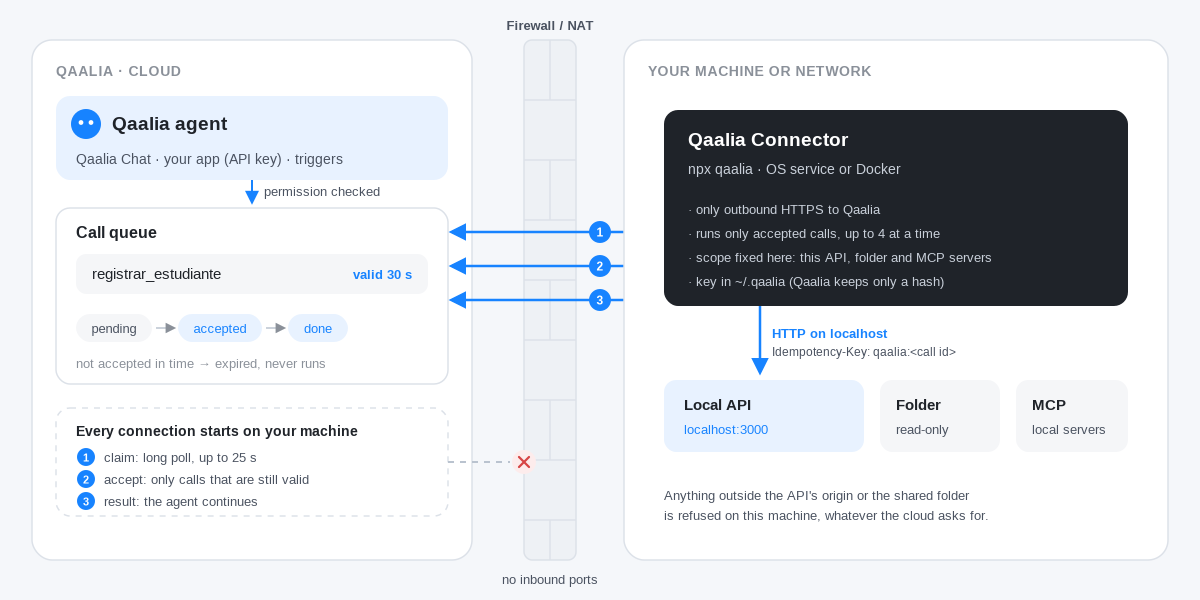
localhost, with an Idempotency-Key header.How the Qaalia Connector picks up a call
- The agent chooses a tool. In Qaalia Chat, from your own app through Qaalia's API with an API key, or from a trigger, the agent decides to call, say,
registrar_estudiante. Qaalia checks the tool's permission and queues the call with a 30-second validity. - The Connector claims it. It keeps a long request open to Qaalia (up to 25 seconds), and receives up to 8 pending calls for that machine.
- The Connector accepts it. Before running anything it asks Qaalia to confirm the calls. Qaalia only accepts calls that are still valid, and the Connector only runs what was accepted.
- It runs locally. The Connector calls your API on
localhost(up to 4 calls in parallel), adding anIdempotency-Keyheader so your API can ignore a duplicate. - It returns the result. The answer goes back to Qaalia over another outbound request, and the agent continues the conversation or uses its next tool.
Why claim and accept are two steps
A single "take this call" step has a failure mode: the machine wakes from sleep, finds a five-minute-old request in its buffer and runs it, long after the user gave up. The accept step closes that gap. A call that nobody accepted within its validity window is marked expired and can never run, so the agent can say with certainty that nothing was executed.
What happens when the laptop sleeps or the network drops?
A local system will go offline: laptops close, offices lose power, Wi-Fi drops. The Connector is designed around a few fixed time windows, all set in Qaalia's source code:
| Long poll | 25 |
|---|---|
| Call validity | 30 |
| Agent waits for result | 40 |
| Heartbeat window | 45 |
| Local request timeout | 60 |
Source: Constants in Qaalia's Connector and its server side (limites.ts, ejecutar.mjs), as of November 23, 2026.
- No heartbeat for 45 seconds: the system shows as disconnected, and the agent tells you right away without queueing anything.
- Not picked up within 30 seconds: the call expires and never runs, even if the machine comes back a minute later.
- Accepted but no answer within 40 seconds: the agent does not retry on its own. It tells you the action may have been applied and asks you to check, so a retry does not create the record a second time by accident.
- Connection lost: the Connector reconnects with a growing wait, from 2 up to 30 seconds, and publishes its tools again when it is back.
One practical detail follows from the numbers. The Connector allows a local request up to 60 seconds, but the agent stops waiting after 40. If an operation of yours can take longer than that, such as generating a large report, make the endpoint accept the job and return an ID right away, and give the agent a second operation to check its status.
What are the trade-offs of an outbound-only connector?
- It only serves its own platform. The Qaalia Connector connects your system to Qaalia's agent: the one you use in Qaalia Chat, call from your app with an API key, or run from triggers. It does not let ChatGPT or Claude reach your localhost. For those, a tunnel is still the answer.
- The machine has to be on. Run it as an operating system service (
npx qaalia servicio instalaruses systemd, launchd or Task Scheduler and restarts it if it fails) or in Docker on a server or NAS that is always on. - Bounded calls. Each call to your machine can take up to 40 seconds, and the shared folder is read-only text files of up to 2 MB, read in parts when they are large.
- Polling, not streaming. Calls are delivered through long requests that Qaalia's server checks every 800 ms, which is fast for business operations but not a real-time stream.
In exchange you get properties a tunnel cannot give you by construction: no public URL to leak, no inbound port to scan, a scope fixed on your own machine, and a key stored in ~/.qaalia of which Qaalia keeps only a hash. Deleting the system in Qaalia disconnects the machine.
Which option should you choose?
- A third-party assistant must call your local service: use a tunnel (ngrok or Cloudflare Tunnel) and put authentication in front of the public URL.
- Your own people and devices need private access: use a private network such as a tailnet or a VPN.
- You want an AI agent to operate a local or internal system: use an outbound-only connector, so nothing is published and the allowed scope stays on the machine.